


Exploring the New Branching Feature in ChatGPT
In recent times, the roll-out of new functionalities for ChatGPT has been rapid, with the latest enhancement from OpenAI being the conversation branching capability. This feature allows users to redirect their discussions in various directions while providing the option to return to the original chat flow seamlessly.
OpenAI’s CEO, Sam Altman, noted that this feature was added due to widespread demand. It can be visualized similarly to creating threads on platforms like Slack or Discord, enabling users to explore tangential topics without muddying the primary conversation.
Using the Branching Feature in ChatGPT

Credit: DailyHackly
At present, branching conversations can only be initiated via the ChatGPT web application, although they can be accessed from any device. Both free and premium users can utilize this feature, but account sign-in is necessary to access it.

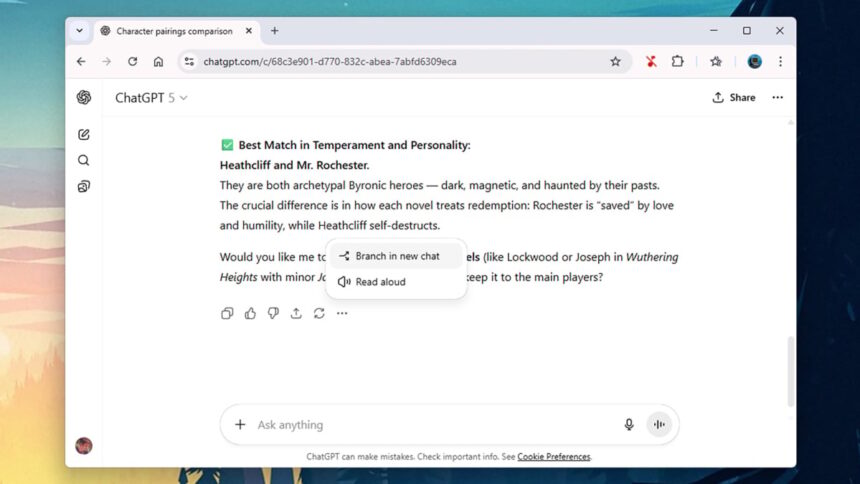
To initiate a branching conversation, simply click on the three dots next to a response and select Create Branch in New Chat. This action opens a copy of the ongoing conversation in a new tab, and a new chat marked with “Branch” will appear in the sidebar.
This enables simultaneous interactions in both threads by switching tabs or navigating through the sidebar. The chats mirror each other until the branching point, after which unique paths can be explored.
Yet, the current implementation may become cumbersome if many branches are generated. Options for organizational efficiency are available—rename or delete unnecessary chats via the three dots next to them in the sidebar or at the top-right corner while viewing a chat.
The ChatGPT Projects feature can also be utilized to categorize different chats into distinct folders. While branched conversations stay within the same project, new projects can be created, and chats can be transferred as required.
Benefits of Utilizing Branching Conversations

Credit: DailyHackly
Branching conversations offer a plethora of advantages. Users may find new discussion paths emerging during interactions with ChatGPT. There’s no definitive right or wrong method to branch out; if a thread doesn’t yield the desired outcome, it can be erased, allowing one to revert to the main discussion.
Consider that composing an email to a superior involves delicately phrasing negative feedback. Utilizing multiple branches enables experimenting with different tones, providing various approaches without redundancy.
For literary enthusiasts, branching allows for diversions exploring specific works while keeping the primary dialogue focused on broader themes and concepts.
Developers also stand to gain. Branching provides a platform for testing different debugging methods or design concepts simultaneously across tabs, with the option to return to the original conversation easily.
Branches can even facilitate the same foundational information being provided to ChatGPT, leading to varied responses framed in different tones, lengths, or styles.









